Contour Next Bluetooth issues: snap the glucose meter instead
Free printable blood sugar log (PDF)
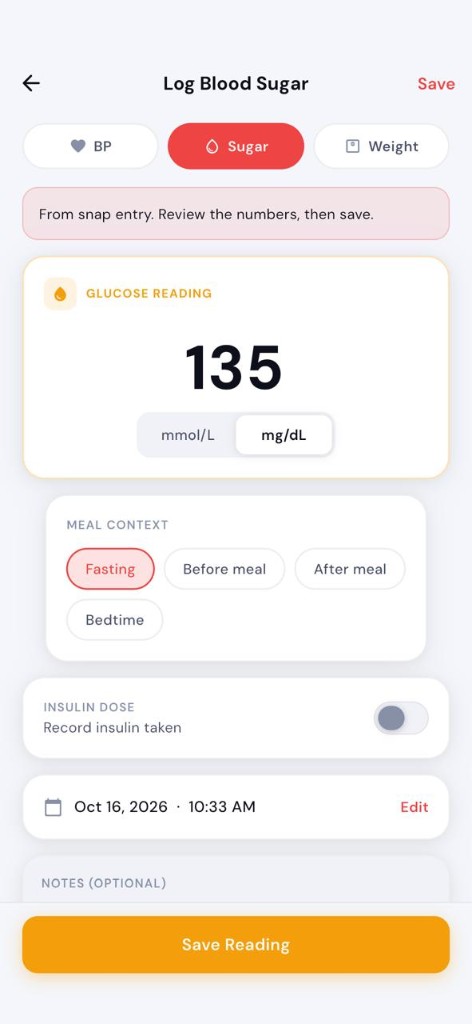
Searches for Contour Next Bluetooth, Contour Next Bluetooth pairing, or Contour Next Bluetooth not working usually mean the same frustration as other meter brands: the strip already worked, the number is on the display, and the phone will not cooperate. Blood Snap lets you photograph the Contour (or similar) display, review the suggested number, and save it to a diary with no Bluetooth pairing.
Contour Next and Contour Next One are Ascensia Diabetes Care meter lines in many markets. Blood Snap is not affiliated with Ascensia, not a Contour app replacement for manufacturer sync or strip programs, and not a glucose meter. Always confirm digits against the physical screen before save. The same diary approach works for Accu-Chek pairing pain — see Accu-Chek without Bluetooth.
Why Contour Next Bluetooth pairing fails so often
Wireless meter setups are picky. Phone OS updates, Bluetooth permissions toggled off, the wrong companion app build for your region, low meter batteries, airplane mode leftovers, or a meter still bonded to a previous phone can all look like “not connecting.” Official pairing steps belong in Ascensia’s documentation and support — this page does not replace them.
- Contour Next Bluetooth not working / not pairing
- Contour Next One Bluetooth setup loops
- App connected once, then stopped syncing after an update
- Permission prompts dismissed and never reopened
Contour Next vs Contour Next One — same diary problem
Marketing names and Bluetooth features differ by model and country. The diary problem does not: you need today’s glucose value in a log you can show later. Whether your unit is Contour Next, Contour Next One, or another Contour variant with a readable screen, the snap path is the same — frame the digits, confirm, save.
Contour Next without a working Bluetooth link — use the screen
A finger-stick Contour check ends with a glucose value in mg/dL or mmol/L. That digit — plus time and meal context — is what belongs in a glucose manager / diary. You do not need a wireless link to type, speak, or photograph it.
Blood Snap’s answer to pairing pain is camera convenience: on-device OCR first (Google ML Kit), optional AI parsing with in-app consent, then you confirm. See the privacy policy. Blood Snap does not pair with Contour hardware, does not stream strips, and does not replace Ascensia clinic or insurance workflows.
Step-by-step — photograph a Contour reading
- Complete the check on the Contour meter your clinician recommended. Wait for a stable value on screen.
- In Blood Snap, add blood sugar → Snap. Select Sugar mode in the camera pills.
- Hold steady. Fill the frame with the digits; avoid harsh glare and shadows.
- Review the suggested value and unit (mg/dL vs mmol/L). Fix any OCR mistake.
- Tag fasting vs after eating when relevant, then save.
Full logging habits: how to log blood sugar at home. Meter vs diary vs CGM: glucometer, glucose meter, and CGM.
How Blood Snap snap entry works (claims match the product)
- On-device OCR first — the phone tries to read digits locally.
- With consent, recognized text may be sent for AI parsing — you still review everything.
- You always confirm before a reading is saved.
- Not Bluetooth. No Contour pairing, no strip stream, no manufacturer cloud replacement.
Snap diary vs Contour / manufacturer app
| Need | Official Contour path | Blood Snap snap diary |
|---|---|---|
| Wireless sync into brand app | Yes, when pairing works | No — photo / type / voice |
| Log when Bluetooth is broken | Manual entry if available | Photograph screen, confirm, save |
| BP + sugar + weight in one place | Meter-focused | Yes — combo tracker |
| Clinic PDF of your diary | Depends on brand export | History → PDF / CSV |
Use the path your clinician and strip supply expect for medical device workflows. Use Blood Snap when you want a simple, pairing-free log and charts of numbers you verified.
Build a glucose diary from Contour checks
Consistency beats perfect wireless sync. Log Contour checks with context, then review 7-, 30-, and 90-day glucose charts. Export PDF or CSV before a visit. Keep units consistent. Broader log-book framing: diabetes log book and glucose log book.
When you still want the Contour app
Keep trying official pairing if your care team or strip program depends on Ascensia’s ecosystem. Snap logging is a parallel path for a personal diary — not a campaign to abandon manufacturer tools. Many people use both: Contour app when Bluetooth behaves, Blood Snap when it does not, or Blood Snap daily because BP and weight live there too.
If a clinic portal only accepts the brand export, follow that rule. If they accept any clear PDF of home checks, a Blood Snap History export of confirmed Contour readings is often enough — ask first.
Lighting, cases, and other snap gotchas
Glossy meter windows reflect kitchen lights. Tilt slightly or cup your hand as a shade. Remove bulky phone cases that block focus if the camera struggles. If OCR keeps missing a digit, type what you see — speed matters less than a correct row.
Not affiliated — and why that sentence matters
Blood Snap does not claim Contour certification, Ascensia partnership, or guaranteed recognition of every firmware skin. Naming Contour Next in this guide is for searchers who already own the meter and need a diary workaround — the same way we write about Accu-Chek and Omron. Always follow your clinician on which meter to use and when to check.
What this cannot do
- Fix Contour Bluetooth hardware or replace Ascensia support.
- Certify meter accuracy or sell strips.
- Guarantee OCR on every font, firmware, or language layout.
- Diagnose or treat high/low glucose — symptoms need care, not an app chart.
Snap Contour readings into Blood Snap. When Contour Next Bluetooth is not working, photograph the meter, confirm the digits, and keep a free glucose diary — no pairing required.
Educational information with public guideline citations. Not medical advice and not a diagnosis. Blood Snap is a personal wellness diary — not a medical device, blood pressure machine, glucometer, or CGM. Always follow your clinician's advice.